
Gate Keypads, Remotes and Intercoms
An automatic gate needs a way to tell who should come through it. That is the work of the entry controls: the keypad at the drive, the remotes in residents’ cars, the intercom a visitor uses to ask to be let in, and the device that opens the gate for traffic on its way out. We wire keypads, remotes and intercoms to the gate’s operator for homeowners, apartment communities, churches, small businesses and the fenced yards behind warehouses.
Signs Your Entry System Needs Work
- Keypad buttons stick. Buttons that need a hard press, or stop answering after rain, usually mean a worn keypad face or moisture inside the housing, and visitors are left waiting at the gate.
- The intercom is silent or crackly. A call that does not ring through, or a line full of static, points to a failing speaker or microphone, a damaged cable to the building, or a fault in the handset inside.
- Remotes lose range. Replace the battery first. If only one remote is affected, the fault is in that remote; if all of them are, look to the receiver, its antenna or radio interference.
- Codes cannot be changed. A keypad whose master code has been lost, or an older unit that holds a single code, leaves the same number in use long after it should have been retired.
- A lost remote or a shared code is a worry. Either one opens the gate for whoever has it, until the remote is deleted from the receiver or the code is changed.
What Each Entry Device Does at the Gate
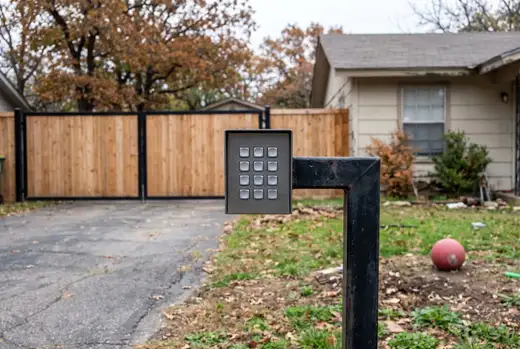
Most gates use more than one device, because the people using them differ. A keypad serves anyone who knows a code, remotes serve those who come and go every day, and an intercom serves visitors who need someone to let them in. Leaving is usually handled on its own, by an exit loop or a button.
Each device sends one instruction to the operator’s control board: open. The board decides the rest, so the devices have to suit the operator they are wired to. Larger sites sometimes add card readers or a telephone entry panel that rings a resident’s phone; both are common in the trade and connect to an operator in much the same way.
| Device | What it does | How visitors or residents use it |
|---|---|---|
| Keypad | Opens the gate when a valid code is entered. Most keypads hold several codes, each added or deleted on its own. | Residents and regular callers enter a code from the driver’s window or on foot. A guest can be given a code that is removed afterward. |
| Remote (transmitter) | Sends a radio signal to a receiver wired to the operator. Each remote is stored in the receiver’s memory and can be deleted from it. | Kept in the car or on a key ring and pressed on the approach, so the gate is already opening as the car arrives. |
| Intercom | Links a call station at the gate to a handset or base station inside, usually with a button that opens the gate from indoors. | A visitor presses the call button and speaks to someone inside, who opens the gate once they know who is there. |
| Exit loop, exit button or exit wand | Opens the gate for traffic leaving. A loop buried in the drive or a wand on a post senses a car’s metal; a button opens the gate when pressed. | Drivers on the way out simply pull up to the gate. People on foot press the button beside the walk-through gate. |
Deciding Who Needs Access, and How
Before choosing devices, list who uses the gate and how often. Each group is better served by its own device or its own code, so one group’s access can be changed without disturbing anyone else’s.
- Residents and family. They use the gate every day, so a remote in each car and a household code for anyone on foot suit them.
- Guests. They can be let in from the intercom, or given a guest code that is changed once the visit is over.
- Deliveries. Drivers call from the intercom or use a delivery code, which can be deleted without touching anyone else’s.
- Tenants of an apartment community. Households move in and out, so each needs its own code or remote, removed when that household leaves.
- Members of a church. Use is heavy at set times and light in between, so a members’ code can serve, with the gate held open during worship where the operator allows it.
- Staff of a small business. Each employee can have a code, or a remote if they drive in, so access ends cleanly when someone moves on.
- A fenced warehouse yard. Daily drivers carry remotes, everyone else uses a keypad or the intercom, and an exit loop lets trucks leave without stopping.
Lost Remotes and Changed Codes
What should be done when a gate remote is lost?
Delete it from the receiver’s memory, so it no longer opens the gate even if someone finds it. Most current receivers can delete a single remote and keep the rest. On some older systems every remote shares one code, and the only cure is to recode the receiver and all the remotes together.
How often should a gate code be changed?
Whenever someone who knew it should no longer have it: a tenant moves out, an employee leaves, a contractor finishes, or the code has simply been passed around. Changing a code needs the keypad’s master or programming code; if that has been lost, or the keypad holds only one code, the keypad may need resetting or replacing first.
Entry Devices for a Gate Already in Place
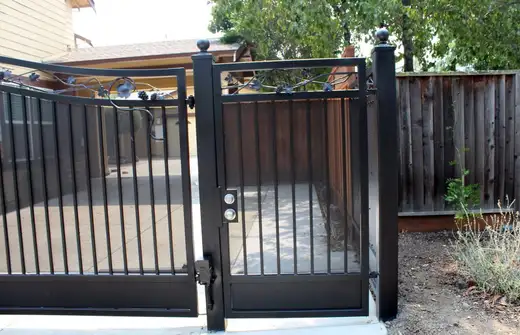
A gate that already has an operator can usually take new entry devices, as long as its control board has a spare input for each one. Older boards may accept only one or two; a newer control board opens up the choice. A gate opened by hand needs an automatic gate opener first, and the gate itself has to swing or slide freely.
Many properties have a vehicle gate and a walk-through gate side by side, and we work on both. A walk-through gate usually locks with a key in a steel lock box on its frame. It can also be given a keypad of its own, which releases an electric lock rather than driving an operator, so people on foot need not wait for the vehicle gate.
Combining Devices on One Gate
Can a keypad, remotes and an intercom all work on the same gate?
Yes, and most entrances use at least two of them. Each device is wired to the operator’s control board as a separate input, so the gate opens for whichever one is used, and one device can be changed without disturbing the others. The board needs a spare input for each device, which is worth confirming before anything new is mounted at the gate.
Does a gate keypad have to be wired, or can it be wireless?
Both kinds exist. A wired keypad runs a cable back to the operator through a shallow trench or conduit and needs no batteries. A wireless keypad talks to a receiver at the operator, which saves cutting across a finished drive, but its batteries need changing and its signal has to reach the receiver reliably.